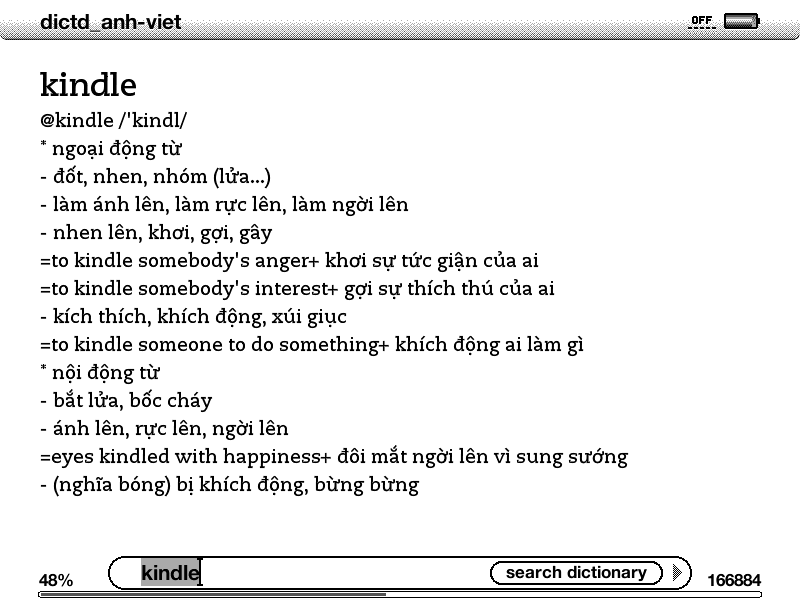
vietnamese dictionaries for kindle


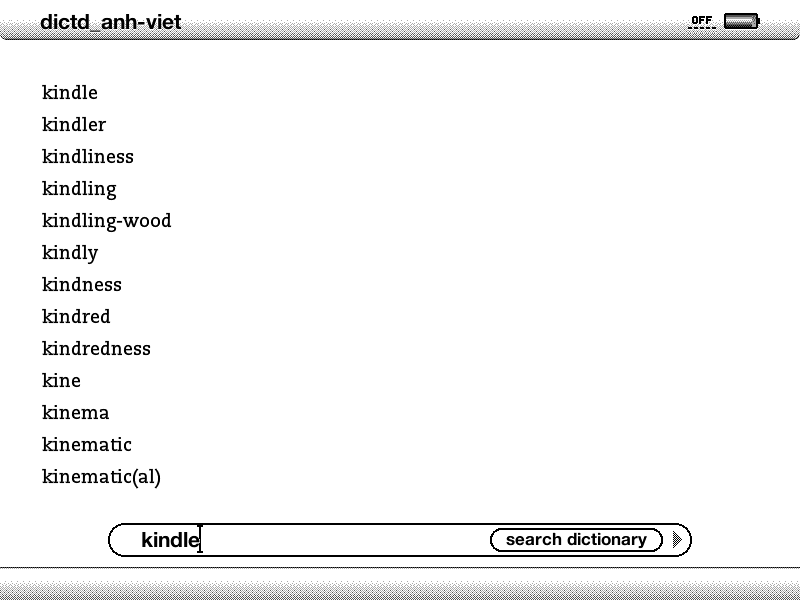
The dictionaries’ screen-shots

Kindle in my idea, is a very promising device, and I’m compiling, for the purposes of reading, some Vietnamese dictionaries for it. For the Chinese language, there’s no non – trivial solution at the moment, but it’s simple for the cases of English and French. Below are the steps I note down for remembering, it’s just a matter of data conversion and packaging. Non – technical readers can skip directly to step #5 below to download and use the dictionaries.

Dictionaries on Kindle have Mobipocket’s format (Amazon bought Mobipocket in 2005). The data set we’re going to use is available on StarDict in which the English ↔ Vietnamese and French ↔ Vietnamese data was originally created by the author Hồ Ngọc Đức. The data set has some minor holes and errors, but it’s the most usable set for Vietnamese at the moment (many Vietnamese softwares, websites… use this data).

1.   Download the data from StarDict, e.g: stardict-dictd_anh-viet-2.4.2.bz2. Extract it, there will be a .ifo (info) file, a .idx (index) file, and a .dz file which actually has .gz format, rename to .gz and unzip to get the real data file (.dict).

2.   Convert the data to an intermediate format, we’re going to make a tab – delimiter file. Fire – up StarDict utility: stardict-editor, jump to the 2nd tab (Decrypt), browse to the .ifo file and have it convert the data to something like: dictd_anh-viet.txt.

3.   Convert to Mobilepocket format: python tab2opt.py -utf dictd_anh-viet.txt. The python script used to convert data is available at this site and would produce a file like: dictd_anh-viet.opf.

4.   Package the final .mobi file: wine mobigen.exe dictd_anh-viet.opf. The mobigen utility is available from here, for convenient reason, I would just use this Windows’ binary via wine.

5.   Connect your Kindle using USB cable and copy the anh_viet.mobi or phap_viet.mobi files over to the ‘documents’ directory. The dictionaries should be available for use right now on Kindle’s home page. We can also set one of these to be Kindle’s default dictionary so that we can lookup words’ meanings without leaving the document we’re on!

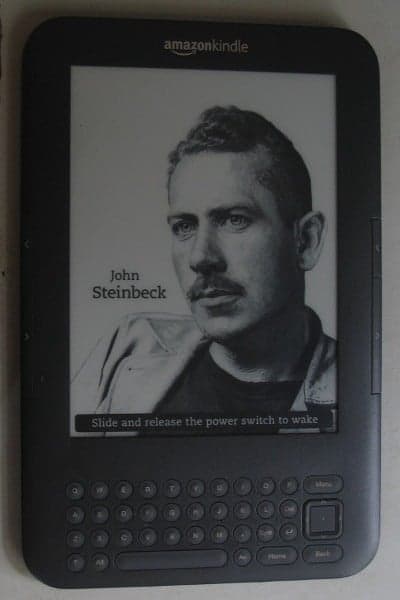
kindle 3


Can not resist to this temptation anymore. Kindle price dropped significantly lately and it’s time to pick a e-ink display book reader for myself. I’ve been curious about electronic paper display, the alternative to LCD or OLED displays widely used on hand – held. Actually there’s been various devices (phone, watch…) which make use of electronic paper, but none has the success like Kindle.

The first impression is that the display, which is 16 gray – scale colors, really looks like traditional paper, and reading on it is an actual pleasure. The screen refresh rate is quite low (maybe less then 6 fps), which means video would never be an option on Kindle. To my surprise, sound is extremely good, the external speaker produces stereo which may be far better than on my laptop. Wifi works fine and the experimental browser (which only supports JavaScript, no Flash, no Java) is enough for basic email and web surfing.

Connecting to my Linux box, the device appears as a normal USB mount to easily copy files over. I find Kindle very suitable for my needs: document reading, a bit of music, and casual web & email. Moreover, Kindle does not create the impression that it is an electronic device. The battery is advertised to last about 10 days (with wifi on, and even more with wifi off), so we don’t have to care about recharging very often. It simply boots up and runs, and displays nice pictures in screen – saver mode.

Amazon recently released Kindle’s SDK beta (Software Development Kit) with Java as the primary language (J2ME), and maybe C/C++ for system development. The machine’s GUI proposes to me a lot of interesting ideas on usabilities and UI design!

whatever happened to programming?

There’s the change that I’m really worried about: that the way a lot of programming goes today isn’t any fun because it’s just plugging in magic incantations – combine somebody else’s software and start it up. It doesn’t have much creativity. I’m worried that it’s becoming too boring because you don’t have a chance to do anything much new… The problem is that coding isn’t fun if all you can do is call things out of a library, if you can’t write the library yourself. If the job of coding is just to be finding the right combination of parameters, that does fairly obvious things, then who’d want to go into that as a career? (Coders at Work – Peter Siebel, quoting Donald Knuth)

Ví dụ về chức năng đơn giản nhất: resize ảnh trên các browsers, ảnh trên: Firefox, ảnh dưới: Chrome, (ảnh được chụp lại và hiển thị nguyên kích cỡ từ 2 browser, cả 2 dùng cùng một ảnh gốc kích thước lớn). Có thể thấy chức năng resize ảnh của Firefox, IE kém rất xa so với các browser khác.

Whatever happened to programming? Điều gì đã xảy ra với lập trình? Khi ở năm 1 đại học (1998), tôi có viết một 3D engine đơn giản bằng Borland C, lúc đó sách vở thiếu, internet thì chưa có. Mục tiêu đặt ra rất đơn giản: hiển thị (xoay) một đối tượng 3D đọc từ file mô tả tọa độ các đỉnh. Bằng những hình dung hình học đơn giản, tôi xây dựng một phép chiếu: giao điểm của đường thẳng từ mắt tới các đỉnh của vật thể với mặt phẳng chiếu chính là pixel được hiển thị trên màn hình. Sau đó ít lâu đọc thêm tài liệu, tôi mới biết đó gọi là: phép chiếu phối cảnh – perspective projection. Một số đoạn code released từ game Doom giúp tôi hiểu rõ hơn kỹ thuật chiếu dùng trong game thực: ray casting.

Sau đó 1 thời gian bắt đầu có internet, chúng tôi lại “say mê” tìm hiểu các kỹ thuật graphics “tối tân” hơn. Còn nhớ lúc đó có trang web winasm.net, nơi chỉ vẻ rất nhiều về Gouroud, Phong shading, light, bump mapping, sprites… Chúng tôi đọc các code viết chủ yếu bằng Assembly, rồi viết lại bằng C/C++ trong cái “engine” của mình. Chuyện là như thế, chúng tôi “nghĩ gì viết nấy”, đa số các trường hợp là “phát minh lại cái bánh xe”, bắt đầu bằng việc tự xây dựng những mô hình, thuật toán “ngây thơ” trong đầu. Cái “engine” của tôi so với các engine chuyên nghiệp bây giờ thì thật đáng xấu hổ, nhưng ít nhất chúng tôi hiểu những ý tưởng, nguyên tắc vận hành cơ bản.

Những điều kể ra trên đây chỉ mới là a, b, c… trong computer graphics, lĩnh vực có rất rất nhiều thuật toán, kỹ xảo, mánh khóe… hấp dẫn và độc đáo. Còn nhớ vì ham thích viết các chương trình đồ họa và xử lý ảnh nên một số môn khác tôi không chú ý tới. Như các môn AI, có lần tôi copy code của một người bạn về nộp làm bài tập (đã được cho phép). Đó chỉ là một chương trình chơi caro (croix-zero) dùng thuật toán A*, nhưng vì cúp cua nên tôi không biết về A*, ngồi cả đêm đọc xem cái chương trình đơn giản đó làm cái gì nhưng vẫn không tài nào hiểu được. Sau đó “bổ túc kiến thức” thì biết là A* cũng chẳng phải là điều gì phức tạp, nhưng nếu không có ý tưởng về thuật toán trong đầu… thì code cũng như một đám rừng chẳng cho anh biết được gì về nó.

Sau đó tôi viết nhiều về xử lý ảnh, tới đây thì nền tảng toán trở nên quan trọng, đa số các khái niệm là đủ phức tạp để không tự hình dung bằng trực quan trực giác được. Nhưng nghiên cứu kỹ lưỡng chút thì rồi chúng tôi cũng hiểu được ý tưởng đằng sau các khái niệm convolution, high – pass, low – pass filters… Nhờ những kiến thức đó mà bây giờ tôi có thể có được những nhận định đúng hơn, ví dụ như một chức năng tưởng chừng hết sức đơn giản như resize ảnh, nhưng cho đến tận bây giờ vẫn chưa được implement đúng trên hầu hết các trình xử lý ảnh phổ biến: GIMP, Photoshop… Có thể các bạn không tin điều này, nhưng GIMP, Photoshop, Firefox… resize ảnh bằng giải thuật tuyến tính nên có thể bỏ đi những thông tin quan trọng, và giữ lại những pixel không quan trọng.

Một số kỹ sư phần mềm nói với tôi: suốt nhiều năm đi làm chưa bao giờ anh ta phải cài đặt một thuật toán nào đã học ở trường, việc lập trình hiện tại chỉ là lắp ghép các module, library ở high – level, rất ít khi đụng đến bản chất thật low – level bên dưới. Tôi cũng đồng ý như thế, một số dự án đơn giản là làm việc ở high – level, không phải sản phẩm nào cũng đòi hỏi kỹ năng sáng tạo, đòi hỏi kỹ sư có hiểu biết sâu về các thuật toán chuyên biệt. Nhưng nói như vậy không có nghĩa là những kỹ năng đó không cần thiết và không quan trọng. Nếu không có những kỹ năng đó thì mãi mãi chúng ta chỉ làm được những công việc “làng nhàng”, thậm chí những công việc “làng nhàng” cũng đòi hỏi những khả năng know – how, tổ chức code nhất định. Trong nghề lập trình tôi vẫn ưa thích kiểu người hay “đi phát minh lại cái bánh xe”.

Thế nên mới biết là những điều nói ra càng đơn giản thì lại càng không đơn giản! Nhiều engineer trẻ tôi gặp sau này thường không có sự quan tâm tới những yếu tố đơn giản và cơ bản như thế. Dĩ nhiên những điều trên đây chẳng có gì to tát, cũng như đa số các vấn đề lập trình cũng không phải là điều gì lớn lao. Nhưng trước hết hãy cho tôi thấy bạn có hiểu biết cơ bản về vấn đề mình đang làm, đừng gọi hai vòng lặp for lồng nhau là: “thuật toán”, hãy có khả năng đọc hiểu mô tả của thuật toán và biến nó thành code chạy tốt… trước khi phán đó là những điều cơ bản không cần để ý tới. Tất cả bắt đầu với suy nghĩ của chính mình, với cái mô hình và trình tự trong đầu mình, chứ không phải bắt đầu với danh sách các khái niệm, chữ nghĩa, API… mà anh thậm chí không hiểu nội dung đằng sau nó! Sau đó thì mới có thể nói đến ý tưởng, điểm mạnh điểm yếu, chỗ dùng được (không dùng được) và sự khác biệt của các công nghệ!

Một cách rất quan trọng để hiểu công nghệ không phải là từ thuật toán, ý tưởng, mà là từ… lịch sử. Nếu quan tâm đọc lịch sử computer graphics, bạn sẽ biết đằng sau “Phong shading” là Bùi Tường Phong, một người Việt. Hay bạn sẽ hiểu tại sao SGI (Silicon Graphics Inc.) có nhiều ảnh hưởng đến thế, tại sao những phong cách, sản phẩm của công ty đó lại thiết đặt nên những tiêu chuẩn vàng trong cộng đồng computer graphics (ví dụ như OpenGL), tại sao máy Mac dùng UEFI chứ không dùng BIOS, tại sao NextStep và OpenStep dùng “vector display” chứ không phải là “bitmap display” như đa số các windowing system khác… Sự phát triển của công nghệ là một quá trình tiến hóa liên quan tới những yếu tố xã hội và con người, chứ không đơn giản là sự phức tạp hóa các ý tưởng kỹ thuật!

chinese rendering server

In my previous post, we can see the image – replacement technique being applied to mathematical formulas rendering. Replacing text by image can be seen in various Web’s techniques, mainly to display things that browser can’t! It’s a possibility that many Web technologies would never converge into common “form factors”: how many years have passed but SVG is still not supported on all browsers, how font technologies are still fighting stiffly with each other? Various issues would always remain unresolved and image replacement, though ugly and inconvenient, could be used as a temporary solution.

As you can see in the image above: the first line is a popular Chinese straight – stroke font that can be seen on most browsers, the next lines are nice calligraphy (brush – stroke) fonts that can hardly be seen on the web! I’m going to try using FreeType2 for a very specific problem: rendering Chinese fonts, the only reason is just simple: aesthetics! Searching around, I can’t find any simple, standalone solution: nice Chinese fonts are very big, a typical ttf file has size from 5MB to 50MB depending on the character set and quality (with that size, it’s obvious that we should use a server side solution). Packages like Pango or Cairo are too complex, and would require additional dependencies (which is unavailable on a free Linux host).

It takes me a whole day struggling with FreeType2’s reference and manual to get it work with Chinese fonts (quite different from conventional Latin fonts indeed), and finally here it is! You can access the executable at: http://tkxuyen.com/freetype2.php with the following syntax: freetype2.php ? text=… &font=… &size=… &color=… here is an example. Below are renderings with different sizes (anti – alias works really well):

text=洛阳城东桃李花飞来飞去落谁家&font=2&size=11&color=111111
text=洛阳城东桃李花飞来飞去落谁家&font=2&size=12&color=111111
text=洛阳城东桃李花飞来飞去落谁家&font=2&size=13&color=111111
text=洛阳城东桃李花飞来飞去落谁家&font=2&size=14&color=111111
text=洛阳城东桃李花飞来飞去落谁家&font=2&size=15&color=111111
text=洛阳城东桃李花飞来飞去落谁家&font=2&size=16&color=111111
text=洛阳城东桃李花飞来飞去落谁家&font=2&size=18&color=111111
text=洛阳城东桃李花飞来飞去落谁家&font=2&size=19&color=111111

and renderings with 3 different Chinese fonts (very big files, installed on server) and in different colors. Just note these fonts are a bit non-standard: they produce traditional Chinese characters as output, but only accept simplified Chinese as input:

text=洛阳城东桃李花飞来飞去落谁家&font=2&size=19&color=FF1111
text=洛阳城东桃李花飞来飞去落谁家&font=1&size=19&color=11FF11
text=洛阳城东桃李花飞来飞去落谁家&font=0&size=19&color=1111FF

Update, Jun 6th, 2021:

Due to some changes on my web-hosting, CGI is disabled for some reason. I really don’t have time to figure out why, so just temporarily remove the Chinese font rendering for now!

FreeType2 is an very handy open source library, it’s available on many flatform: Unix, Dos, Windows, Mac, Amiga, BeOS, Symbian… and it does a very good job of handling typefaces! Since FreeType2’s patent issues have expired since May, 2010, we would see an increasing application of FreeType2 in many areas.

This is my very simple C code (~250 LOC) to experiment with FreeType2: loading font, loading glyph, rendering bitmap, dealing with Unicode… To compile, just something like: gcc gifsave.c freetype2.c -o freetype2.cgi `pkg-config --cflags --libs freetype2`. I hope I can have time to extend the code into a more usable form: multi – line layout, alignment, RTF support, etc… Some restrictions are imposed to protect the server, if some text can’t be rendered (e.g: rendering dimensions are too large), an error image like this is displayed instead:

latex rendering server


Some example expressions rendered by MimeTeX (it’s good to appear to be smarter than you are!) If an expression fails to be rendered, you would see an error image like this:

Recently, the wonderful yourequations.com site (which I’ve been using to occasionally render mathematical expressions on web pages) has ceased it’s service due to heavy traffic. I was thinking about running my own LaTeX rendering server, things turned out to be pretty easy as follow, thanks to the excellent MimeTeX package, a LaTeX reduced subset. It’s also interesting to experiment the “stone age technique” of CGI, first download and compile the package:

wget http://www.forkosh.com/mimetex.zip
unzip mimetex.zip
cd mimetex
cc -DAA mimetex.c gifsave.c -lm -o latex.cgi
# test the binary, view the ‘fermat.gif’ image
./latex.cgi -i “a^2+b^2=c^2” -e fermat.gif

Uploaded to host, latex.cgi runs without any dependencies. The ugly thing with my (free) Linux host is that although it does allow CGI, it doesn’t allow CGI to return documents of type ‘image/gif’ no matter what. To work around, I wrote a small PHP script, which parses the GET input, calls CGI to generate and save image in a cache directory, then redirects request to the LaTeX image. This also helps not to expose your CGI directly on the web too!

// use ‘system’ command to execute CGI
$cmd = “$mimetex_path -e “.$full_filename;
$cmd = $cmd.” “.escapeshellarg($formula);
system($cmd,$status_code);
$text = $pictures_path.”/”.$filename;
return $text;

I’ve been always loving CGI for its simplicity, CGI, Perl, Python… old things never die! Although I have almost no experiences with them, they let you do whatever you want to given a little tweaking know – hows. Please note that MimeTeX is not as full – featured as LaTeX, it can’t render some too – complex expressions and it uses an ugly bitmap font. If your server has some LaTeX support, consider using MathTeX, a more advanced version from the same author.

Update, Jun 6th, 2021

Due to some changes on my web-hosting, CGI is disabled for some reason. I really don’t have time to figure out why, so just temporarily remove LaTeX rendering for now!

technical debt

Các yếu tố nội tại ảnh hưởng đến sự thành bại của một dự án phần mềm, chưa nói đến các yếu tố ngoại cảnh…

Những gì nhắc đến trong bài này không phải là “rocket science”, cũng chưa đáng gọi là công nghệ tối tân. Đó mới chỉ là các kiến thức cơ bản mà đa số có thể học được ở nhà trường, cộng với kinh nghiệm sau một vài năm làm việc! Tại sao thực trạng đa số coder Việt Nam như tôi thấy lại ảm đạm đến vậy? Những gì họ học được đều hình thức, hời hợt, nằm trên bề mặt con chữ và khái niệm suông, ít người có được kiến thức thực dụng khả dĩ tự làm được những product mới!

Một phần là do đa số coder làm việc trong những dự án out-source, code họ viết thường là những đoạn nhỏ không quá 1000 dòng, thêm vào trên khung sườn do người khác viết sẵn! Phần khác là khả năng tự tìm tòi, tự giải quyết vấn đề bằng chính suy nghĩ của mình. Nếu họ biết tự thử nghiệm những project cá nhân nhỏ cỡ 30 000 ~ 50 000 LOC chứ không copy & paste code thì kinh nghiệm, độ nhạy bén trong cách tiếp cận & giải quyết vấn đề, khả năng sử dụng ngôn ngữ & công nghệ của họ đã khác!

Một lý do nữa là do cách dạy, cách học từ chương chỉ giúp cho sinh viên có được một mớ ngôn từ, khái niệm trống rỗng mà không thực sự hiểu nội dung sâu bên trong của chúng, và càng không biết các cách ứng dụng, kỹ xảo dùng trong thực tế. Đa số né tránh các bài toán cấp thấp và cụ thể, thích sử dụng các thư viện có sẵn với lý do don’t reinvent the wheel – đừng phát minh lại cái bánh xe. Cách ngụy biện đó vẫn đứng vững cho đến khi chúng ta đi chế tạo cái xe thì phát hiện ra đến cái bánh chúng ta cũng chưa làm được!

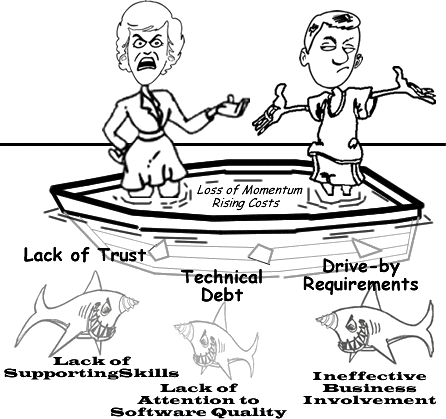
Technical debt là một ẩn dụ đôi khi được dùng trong ngành công nghệ phần mềm (CNPM), và là ẩn dụ đúng nhất cho thực trạng CNPM Việt Nam hiện tại. Phát triển phần mềm cũng như mọi công việc kinh doanh khác, về bản chất giống việc vay nợ, tức hiệu suất sinh lời phải đủ để trả lãi và quay vòng vốn trong một khoảng thời gian nhất định. Dĩ nhiên các yếu tố kỹ thuật khó lòng có thể được định lượng như tiền bạc, nhưng theo một nghĩa nào đó, nếu tỉ lệ các vấn đề được giải quyết thấp hơn so với tỉ lệ các vấn đề phát sinh, thì điều đó có nghĩa là dự án đang “tăng trưởng âm”. Tuy mượn một thuật ngữ từ lĩnh vực kinh tế, song “nợ kỹ thuật” thuần túy đề cập các vấn đề kỹ thuật như được trình bày sau đây:

NỢ LOẠI I

Đây đơn thuần là sự yếu kém về khả năng kỹ thuật và khả năng hiểu biết làm chủ công nghệ. Sự yếu kém này gồm nhiều dạng:

Kỹ năng cơ bản: có lần một senior engineer có 6 năm kinh nghiệm hỏi tôi về một khai báo C++ như sau (nằm trong file .cpp):

int CSomeClass::m_someVariable = 1;

Sau 1 phút xem xét vấn đề, tôi hiểu ngay là người này không biết cách khai báo “static member variable” trong một “C++ class”, anh ta nghĩ nó cũng giống Java, chỉ cần khai báo trong định nghĩa class (file .h) là đủ.

Khả năng am hiểu công nghệ: một lần khác, một technical manager trình bày với tôi về 3D, OpenGL… anh ta nói rất nhiều về các khái niệm, thuật ngữ, danh sách dài các API. Nhưng chỉ sau một vài câu hỏi, tôi biết ngay người này không hiểu cách thức hoạt động cơ bản của một 3D engine, chưa nói đến các chi tiết phức tạp của một 3D driver. Mãi 4 tháng sau đó, sau một quá trình mày mò, anh ta mới bắt đầu hiểu ra những yếu tố đơn giản như: các hàm vẽ 3D không làm việc cùng một cách như các hàm vẽ 2D.

Sự yếu kém của các coder Việt nam tập trung nhiều vào nhóm Nợ loại 1. Những kỹ năng cơ bản cần phải được đào tạo thật kỹ, không phải chỉ là lý thuyết mà còn là các kỹ thuật, kỹ xảo ứng dụng thực tế. Nó giống như một người nói về kiếm, dĩ nhiên anh ta có thể nói về các “kiếm chiêu”, “kiếm pháp” anh ta học (đọc) được ở đâu đó. Nhưng điều này hoàn toàn khác với chuyện anh ta có thể dùng kiếm để chiến thắng những đối thủ (dự án) khó khăn, sừng sỏ!

Yếu kém về kỹ năng cơ bản kéo dài thời gian thực hiện những feature nhỏ, làm không đúng cách khiến phải làm đi làm lại nhiều lần. Tôi đã thấy một người implement một UI’s button: đơn giản chỉ là vẽ một cái nút với 1 dòng text & image. Anh ta không thực sự hiểu nó làm việc như thế nào, anh ta copy code từ đâu đó. Có thể các bạn không tin nhưng đó là sự thật, cái button được sửa đi sửa lại suốt 6 tháng mà vẫn chưa hoạt động đúng!

Sự yếu kém trong hiểu biết công nghệ cơ bản dẫn đến nhiều hệ quả nghiêm trọng hơn: định hướng sai, không hiểu các yêu cầu hợp lý và không nhận ra những yêu cầu phi lý của khách hàng, phí phạm tài nguyên cho những bước đi sai lầm. Hậu quả nhẹ nhàng nhất là: chỉ giải quyết được vấn đề trong một số tình huống phiến diện, thiếu bài bản. Nhưng thường thì hậu quả không tốt đến thế: làm sai lệch các hiểu biết chung của dự án, sử dụng công cụ, công nghệ không đúng chỗ, đặt ra những mục tiêu không tưởng, không có thật.

NỢ LOẠI II

Là những quyết định sai lầm (về kỹ thuật hay quản lý) dưới các áp lực từ phía kinh doanh hoặc từ những độ đo, cách đánh giá không phản ánh sự thật, duy ý chí.

Một ví dụ nhỏ: sau khi định hướng, khung ứng dụng được dựng lên trên nền một “3D test driver”. Bản thân driver là một “school project” có cải tiến chút ít, bản thân ứng dụng được viết trên một số giả định về các khả năng mà driver và hardware có thể cung cấp. Sau khi test, ứng dụng không đạt yêu cầu, và do đó quyết định optimization được đưa ra: chúng ta biết việc này ảnh hưởng đến kiến trúc cơ bản và lâu dài của software nhưng trước hết nó phải pass được 1 số measures nhất định!

Dĩ nhiên người có kinh nghiệm sẽ hiểu ngay là các độ đo đặt không đúng chỗ: driver và application mới chỉ là những code đơn giản, khó lòng có thể optimize nhiều, hardware 2D cũ hoàn toàn không đáp ứng, thậm chí là không tương thích dù là trong concept với các yêu cầu 3D mới. Và cũng không khó khăn để nhận ra: dường như với tác giả cái “3D driver” này, đây mới là lần đầu tiên ông ta thử nghiệm các kỹ thuật 3D, dĩ nhiên các concepts “bài bản” vừa học được đều rất đẹp cho đến khi người ta biết rằng 1 “real world project” hoàn toàn khác 1 “school project”.

KẾT LUẬN

Những món nợ kỹ thuật dù lớn, dù nhỏ đều góp phần ảnh hưởng tới hiệu suất và sự thành bại của dự án. Tất cả đều có chung nguyên nhân: chất lượng nguồn nhân lực! Các thành viên cần phải được chuẩn bị (kiến thức & kinh nghiệm) cho vấn đề mình đang giải quyết, từ khâu design đến coding, cho đến các scopes & milestones của dự án. Trong một dự án nhiều người, nhiều giai đoạn, tất cả những món nợ này được tích lũy theo cấp số nhân: sửa sai trên những code sai của những định hướng sai… và kết quả là lãi mẹ đẻ lãi con và nợ trở thành không trả nổi.

engineering dogmas

Over the years in our software community, I’ve seen a lot of dogmas, myths and lies that spread like ‘cholera’. That only reflects the fact that many programmers just repeat like parrots what they ‘learned’ from school, news, books… without their own justification, and to some extent, reflect their lacking of experiences. A good engineer should, at least, have some abilities to judge the pros and cons, weak points and strong points, when to use, and when not to use a method, a language or a technology.

Design first, then code!

The principle is, in general, not wrong. However, pragmatically, a software’s final structure, architecture… is not achievable as product of an immediate thought or a single design cycle. In most cases, the “first design” is certainly not the correct one. It’s not in a deterministic process that we can build software, complex product would always requires a lot of trial and fail. And from my experiences, good designs are sustainable solutions after a tedious process of experiments to eliminate wrong directions. We need coders of strong analysis and experimental skills rather than the “evangelic designers”!

Where are the documents?

We are going to make clear distinction: do we need coders who really understand what they are doing, or we just need some paper to present to customers? In countless cases did I see that coders do not understanding what they are doing: they don’t understand a feature, they don’t know how to archive that, they are unable to judge the pros and cons, they just mechanically copy and paste code from somewhere. Documents only provide rough, general views on the matters. If you’re going to mention about a static-web-page project, I would agree that document is something. But if you’re mentioning system programming, it’s the code that is the document!

Poor skills and wrong knowledges

This is simply put: countless! Just to name a few:

Poor skills: once, a coder being asked to fix a “null pointer exception”. What he did is adding a “if (pointer != NULL)” line into the code. It’s not fixing, it’s just hiding, fixing is find out why the pointer is NULL, not prevent it from being executed! Another time, another coder, getting frustrated under a crash situation, place a “try… catch” around the buggy code segment. This is again, not fixing, with this way of hiding, we’re just going to accumulate faultinesses until the software crashes silently for no reasons!

Object oriented programming rules: OOP is more beautiful in theory than in practice. OOP provides a nice way for modeling, but it come at costs: bloating code. It is not until the project grows above 1M LOC that OOP become a burden, that we would need to do the “functional decomposition” optimization tasks. It’s the execution (functional) tree that decides performance, not the inheritance tree that obscures runtime characteristics!

Design pattern rules: this is again, not true! I agree that patterns reflect some good coding practices, but software could never be built from the so call “patterns” (there hasn’t been any such proven process). I really don’t understand what is a “singleton” if it’s essentially (in C/C++ syntax) a static variable, I also don’t understand what we need from a “factory” if it’s essentially a “switch… case” structure!?

Management myths

Managers tend to forget what they’d learned when they were coders. There’re lots of myths in software management, just some examples:

  • Software people is of a same type and the same background.

  • We already have a book that’s full of standards and procedures for building software. That provide out people with everything they need to know!

  • If we get behind schedule, we can add more programmers and catch up.

  • Project requirements continually change, but change can be easily accommodated because software is flexible.

There have been extensive criticisms on various OOP models and OOP implementations (Java, C#, C++, MFC, Objective C, glib…) The AntiPatterns wiki and many other authors provide good anti-examples on the uses of patterns!

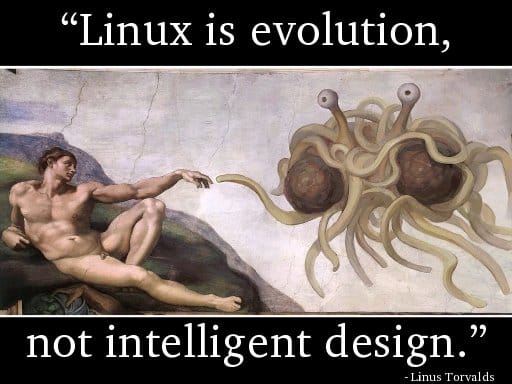
Linus Torvalds, being criticised: “the kernel has no obvious design”, had replied: “Linux is evolution, not intelligent designs”! The same applied for similarly complex projects!

Document is for understanding, but is not the understanding itself.

Software project management is the domain of vast diversity! No simple rules applied to a software process!

3d particles

Some funs with 3D effects. Just some years ago, rendering 3D particles like water, smoke, fire, fog… was an extremely hard task. I remember how struggling it was for me to build 3D models for a waterfall (with moving water) or a shouting-crowd stadium. It’s enjoyable to see how graphics has advanced in the past few years, these effects are now easily achievable.

Video above: the classical Utah teapot with steam coming out from its spout, rendered with Panda3D, the well-known open-source game engine originally released by Disney, which has a feature-rich C++ core with Python scripting for application development.

basic algorithms

The book is my primary source of interest while being a freshman, which presents a wide range of algorithms in a very coherent and systematic way. I remember “rescuing” this hard-copy from a Fahasa‘s junk pile for about 4 USD, which from that time on became a student’s most precious thing! You can read the soft-copy here.

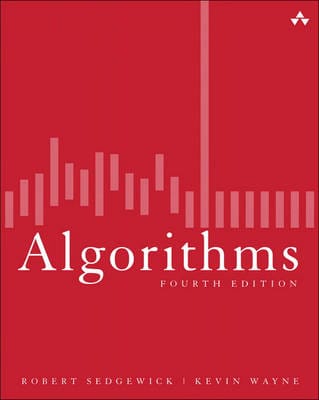
This is among the subjects I was very fascinated the early years at university: algorithms, graph theory, geometry, image processing… I was not quite good at “symbolic” math (like algebra), but “visual” math offered me much inspiration. The thing I would remember most is Robert Sedgewick‘s Algorithms, a book that I’ve read through over and over again many many times. It is indeed the most important Computer Science textbook that beginners MUST read until today.

The Java applet below is “refurbished” from the code I wrote the first year at college, which visualizes the nature of different sorting algorithms (original code was written in Borland C++ 3.1 with BGI – Borland Graphics Interface). This is among my various attempts to visualize the knowledge collected from the book, which had taught me that even a simple thing like “bubble sort” is not that “very simple”! Let select an algorithm in the dropdown list and click ‘Start’ and see the differences!

My visualizations above are very early (1997), much prior to those demonstrations on wiki. Later on, I’d learned that the author R.Sedgewick put a great emphasis on algorithms’ visualizing himself, his work used PostScript. Many new ways of visualization are really impressive and easy to understand, such as this (using JavaScript).

I started with with C/C++ at school, then continue with C/C++, Java, Design Patterns… on various projects. Later I abandoned Design Patterns (and Java), then I abandoned C++. To me there’s no Design Patterns, there’s only data structures and algorithms! Would write another post on the bloating and non-sense usages of Design Patterns later on!

It seems that most software engineers today lack fundamental knowledges and skills. It’s quite apparent that you could not rely on a guy talking about architecture, GoF’s design patterns… all the time but can not state the algorithmic differences between a DFS (depth first search) and a BFS (breadth first search).

3d graphical user interface

The code is written in C++ base on Clutter 1.2.4 library. It shows basic widgets: tabbed container, scrolling container, list box, combo box, check box, edit box, button, label, radio button…

This is my personal project in which I tried to evaluate some new ideas and concepts in using 3D techniques for GUI (Graphical User Interface). It’s quite tiny indeed (about 6000 LOC – line of code), all written by myself in about a month (mostly in my free times at weekends). So please don’t blame me on some un-completed or un-polished features, they are just for testing the ideas only. I would try to examine the trend of applying 3D graphics to GUI, but first, let have a look at the video below.

1.   The first thing to consider is not 3D engines or hardwares, it is about usability. Many traditional (2D) GUI out there are already complex and obstructive. GUI is about information presentation and presentation should be really simple and clear so that even my grand mother can understand and use. I’ve been seeking, trying to explore many new ways invented to represent information in 3D (or 2.5D) space, and I could say only a very very small percent of them could make a usable value. Users have long been familiar with 2D, and yet 3D hasn’t been very much persuasive.

2.   3D hardwares can be categorized into 3 groups (as listed on the left), and the 3D engine can be configured to off-load calculations to hardware. With the 1st type of device, only bitmap operations could be off-loaded. With the 2nd type of device, many drawing operations (the path_xxx functions) can be off-loaded. The 3rd type of hardware is most valuable since we can have its finish for ourselves a lot of work.

It’s important to understand the target device our software stack would be running on. If it is an out-date machine with just some blitters, we should use paint-like (aka: bitmaps) operations, while on most modern PC, draw-like (aka: 2D vector) operations are more encouraging. While bitmaps may offer nicer and more customizable GUI, the cons is it lacks the scalable ability that vector has.

3.   The last is about software implementation. Many of the graphics concepts are first introduced in software, which then embedded to hardware, which then standardized by software (like OpenGL or DirectX) again. Thus, many elements of a graphics pipeline is the production of a long history of interactive evolution. A graphics pipleline is not a general framework, it depends on very detailed, in-depth techniques to be operational in real-world application.

Game & graphics are the domains where most formal software methods would easily failed. 3D graphics developers should have good knowledge on graphics in general (bitmap and vector drawing), geometry, linear algebra & discrete maths, deep understanding on data-structures and algorithms… are strong pluses, advanced tips & tricks in coding and optimization is a must (game & graphics programming has always been a hell of tricks from the age of dawn) and finally good understanding on 3D techniques (model, scenegraph, projecting, shading, clipping, lighting, effects…)

3d

We are building something like this, a 3D user interface. Day by day, we’re witnessing more and more diversities in computer user interface: concepts, designs, look and feel, animations, effects… While some would stick to an bare – bone, obscured text console, the others prefer some fancy, eye – candy GUI with all its bells & whistles. Things are much easier now with many 3D libraries and tools. Remind me about how I did all the 3D things: polygon, mesh, texture, sprite, shading, lighting, scene – graph, etc… with C & assembly on DOS!

vim for programmer

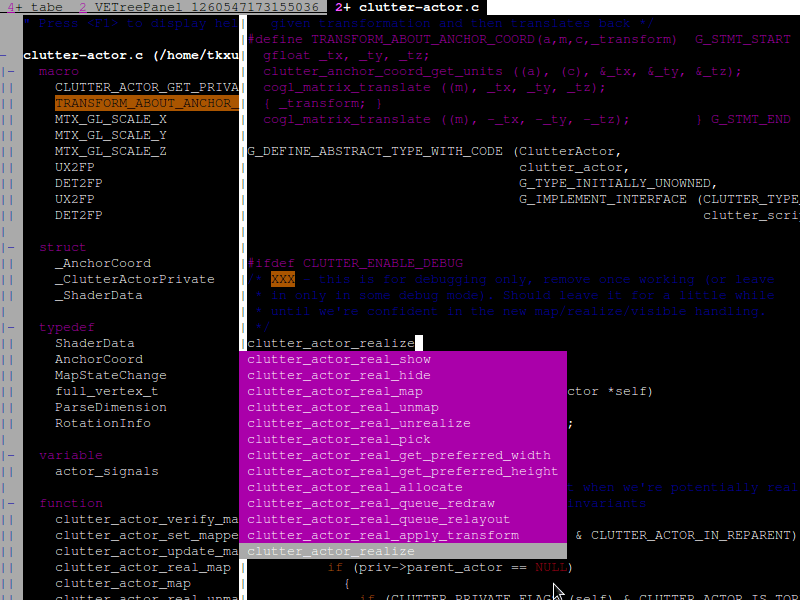
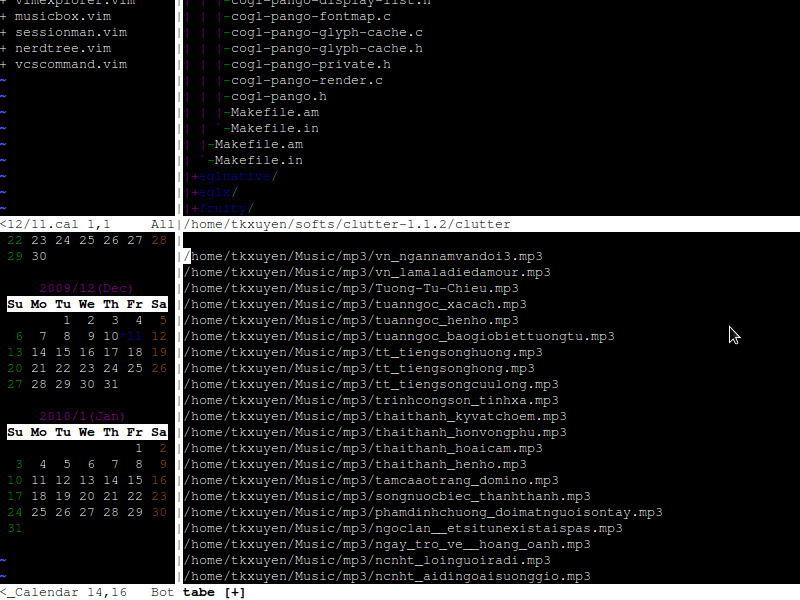
VIM “IDE” with symbol – browsing and auto – completion

Various utilities inside VIM: media player, calendar, file explorer…

I have been using VIM for most of my daily programming, and everyday, I’ve been discovering new things about VIM. We can tune VIM into a full-fledged and powerful IDE (Integrated Development Environment) that far surpasses every others! With ctags and taglist.vim, we can build tags database, which would then enable searching, browsing all symbols, variables, functions in a code – base. cscope enhances ctags even more with advanced search & browsing features. And I would need no external diff tool since we’d already have vimdiff to compare and merge code.

Working with different types of version – control system, we’d already had vcscommand.vim, which can help interfacing with svn, cvs or git! To interact with file system, I would use NERDTree or vimExplorer, a lot of tasks with fs is done even without leaving VIM! I’m not fool enough trying to do everything with VIM, but there are many other plug-ins that you would find useful: a.vim and c.vim would help you a lot in C/C++ programming, calendar.vim helps you viewing date, and keeping small notes (diary) for each day, musicbox.vim serves you with media playing inside VIM, and vimail helps send, receiving emails with just a few convenient keystrokes!

fooled by randomness

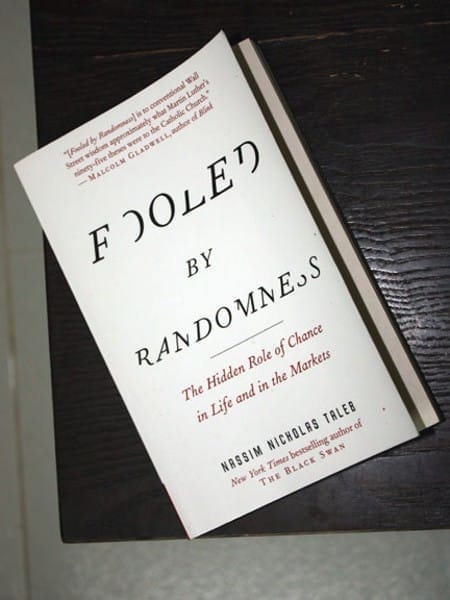
Usually on my birthday, I would receive messages like: Congratulation to the Party! Congratulation to the government! Congratulation to President Ho Chi Minh! (the day happens to be also the Man’s birthday). But last month, I received this book, a nice gift from a friend, a soft – paperback hard – copy of the famous writing: Fooled by Randomness! I’m now half – way through the book, a bit difficult for non – English – native readers, but really interesting in every details!

My major hobby is teasing people who take themselves & the quality of their knowledge too seriously & those who don’t have the courage to sometimes say: I don’t know. You may not be able to change the world but… (www . fooled by randomness . com)

As with every outstanding thinkers and thinkings, the book’s caused controversies since it was first published (2001), written by Nassim Nicholas Taleb, a skeptical scholar and at the same time, a successful trader. I’ve been for long, looking forward to these types of cognitive thoughts! It’s too soon to have some comments on the book, but for now, the debate between Einstein and Heisenberg, between determinism and un – determinism would just go on!

elektronika

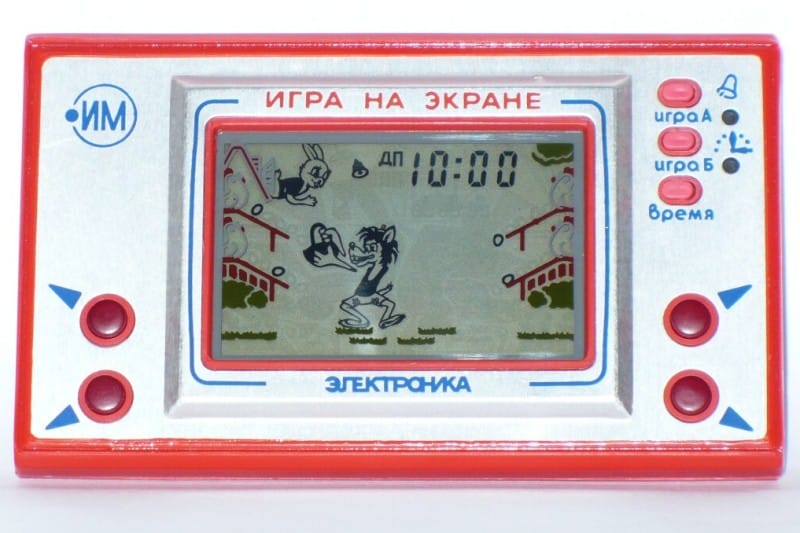
Russian Elektronika clone

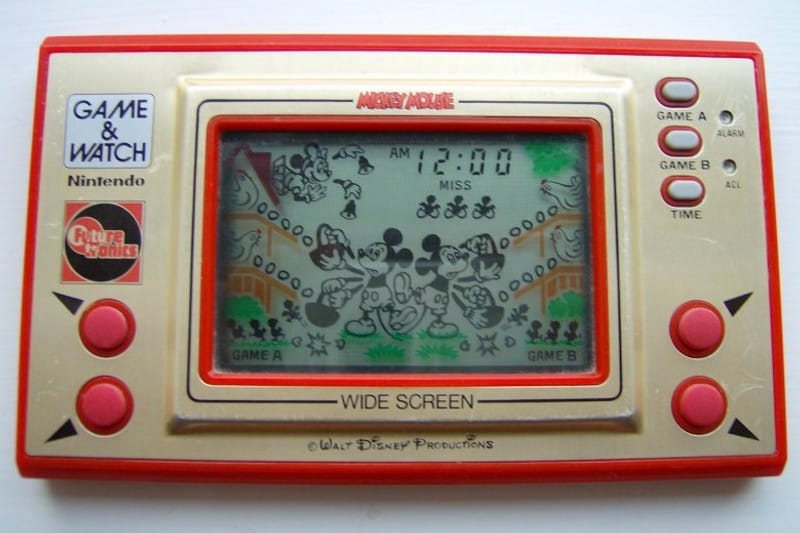
Nintendo Game & Watch original.

A very sweet souvenir, a sudden reminiscence that happen to recall, my first computer game. Some day in the mid-80s, I’d got a gift, a Soviet built, hand-held device. I still remember the sound, the addictive feelings came with it! The game featured a wolf, a rabbit, likely to be seen in the Nu, pogodi! cartoon series (pronounced by us – little child as nupacachi). The game’s goal is trying to catch falling eggs, if an egg missed, it breaks and a chick is born. If 4 chicks are born, you lose! I played hundreds of games on this pad, then batteries ran out but can’t find anywhere replacement back then.

Several years later, in the late-80s, these types of games became obsolete, then seen the Nintendo’s Famicom console widespread. Now I know it was a clone of Egg (a variant of Mickey Mouse), played on console manufactured by Nintendo. Although capable of building super computers, the Soviet Union was, at the time, in shortage of consumer goods, they choose to reverse engineer various Western products.

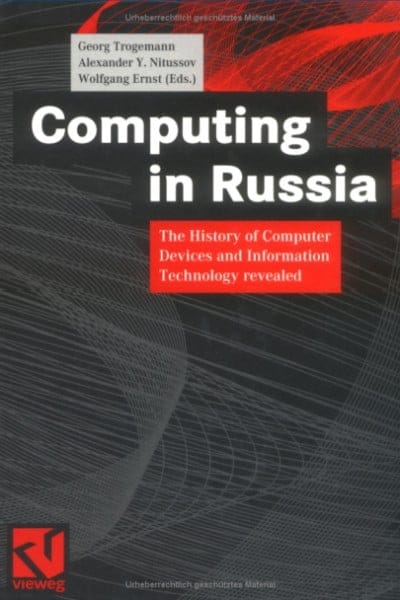
It’s very interesting to learn about separate branches of electronics and computer science in the USSR. They had distinctive type of computers, architectures, operating systems, programming languages… Some are even found nowadays quite bizarre like the trinary computers (as apposed to binary systems we’re extensively using). It should be noticed that the Russian had very successful specific-purpose models that offer superior power in narrow fields (such as ballistic computing). Areas in their separated genealogical branches of science and technology remain mysterious until today, some are covered in the book Computing in Russia, a highly-recommended reading!

Update, May, 13rd, 2009

It was kind of a very first and famous game, yet only ones at the time know about it, in the early and mid 80s. After searching a while, I found various simulators for playing the Game & Watch series, on Linux, on Windows and even on Mac. On the left is Flash version of the game, the Soviet variant named Nu, pogodi!, you can guess from Cyrillic letters above the screen. Enjoy!

ô ăn quan

Có 50 quân dân, và 2 quân quan, mỗi quan tương đương 10 dân. Người chơi có quyền chọn di chuyển theo hướng bất kỳ, những game Mancala khác chỉ được di chuyển theo một chiều nhất định.

Ăn quân ở ô kế tiếp trong lượt đi chứ không phải ở ô đối diện của đối phương. Khi đến lượt mình mà không còn quân để đi thì phải bỏ 5 quân đã ăn được vào 5 ô của mình để tiếp tục chơi. Trường hợp không có đủ 5 quân thì phải vay của đối phương và trả lại khi trò chơi kết thúc.

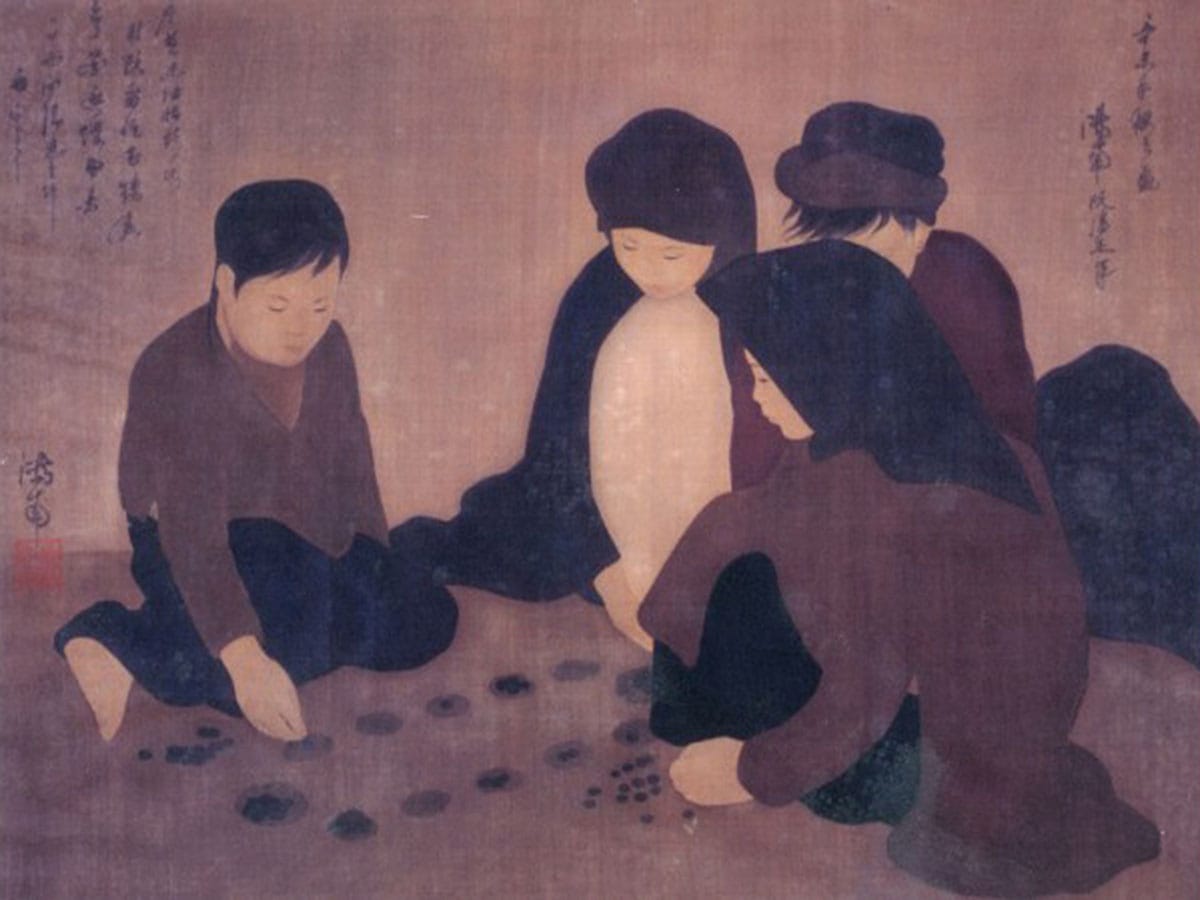
Trò chơi dân gian Việt Nam Ô ăn quan thuộc họ Mancala, có nguồn gốc châu Phi và có hàng chục biến thể khác nhau trên thế giới. Khi nhỏ, tôi có chơi trò này vài lần, gọi theo tên địa phương là Ô làng chứ không phải Ô ăn quan. Hôm nay thử nhìn cái game này dưới góc độ tin học xem sao! Ô ăn quan có một số luật khác với những game Mancala khác.

Những luật bên, nhất là luật thêm & mượn quân làm Ô ăn quan phức tạp hơn nhiều so với những biến thể Mancala khác. Viết một chương trình cho máy tính chơi Ô ăn quan không phải là quá dễ dàng, dùng những heuristic đơn giản (hill-climbing, min-max, hay brute-force đến một độ sâu nhất định…) không đủ bảo đảm máy tính sẽ thắng trong nhiều trường hợp.

Trên internet, tôi không tìm được game Ô ăn quan nào theo đúng luật Việt Nam. Một số là những biến thể gần giống Ô ăn quan, một số tác giả claim là đã viết Ô ăn quan nhưng không cung cấp được link download. Có vẻ như game này không dể như khi vừa mới nghĩ đến! Bạn nào có ý kiến về chiến thuật chơi game này xin được trao đổi để cùng phát triển một trò chơi hoàn chỉnh.

Bên đây là screenshot của một Java applet tôi vừa viết trong vài tiếng đồng hồ, cho phép 2 người chơi với nhau (máy tính chỉ kiểm luật, chưa phải là một chương trình cho máy tính chơi thực sự). Những hiệu ứng đồ họa: di chuyển quân, ăn quân nhìn rất giống thật, graphics được vẽ bằng Photoshop: những viên sỏi và bàn chơi được vẽ bằng phấn trên mặt sân xi-măng… gợi lại những kỷ niệm thủa nhỏ.

minesweeper

Two more hours of work and I’ve added this hexagonal tiles to my MineSweeper! Anyone interested in the game can found the tiny binary and source code (450 LOC) here. Mine sweeping with hexagons is quite a different experience! More about MineSweeper, a simple game?

On the left: Minesweeper with hexagonal tiles

virtualization

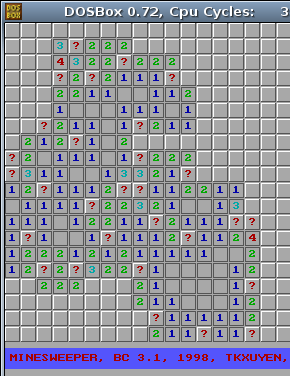
MineSweeper running in DOSBox

Click the demo page below (jpcapplet.jar – 1.8 MB in size), it would take some times to load, embedded in it is a DOS image (floppy.img) of a floppy’s size (1.4 MB). In Linux, using dd to create a blank image file, launch JPC app, mount the empty image, fdisk to give it a partition structure, format to give it a bootable FAT12 file system, copy the files over, edit autoexec.bat to have the game run at startup, and voila – there you are, the classic DOS game of MineSweeper on the web!

Beside is screen-shot of my very first programming, the classic MineSweeper, an exercise I did first year at university. After getting started with Borland C++ 3.1, I began to write numerous toys like this; small games, graphics, animation, 3D… are among the things I was very fond of. We still had not had Internet in Vietnam then, lacking of information, we’d reinvented many wheels, including a package for displaying 3D objects (in form of polygon mess), a complete GUI for DOS with window, menu, toolbar, all kinds of controls: combo, list, button… But as they say: don’t reinvent the wheel, unless you plan on learning more about wheels, the reason we did all that fun stuff.

Back to my MineSweeper, it’s tiny, about 350 LOC (Line Of Code), using BGI (Borland Graphics Interface), C/C++ and some ASM. Yesterday, just want to check the old source, but didn’t have a Windows machine at hand, I needed to run the Borland C++ 3.1 compiler on my Linux box. Wine is good for many Windows applications, but it simply won’t work with pure DOS programs. Then I found DOSBox, you start it up in form of a console, mount a directory in local file system, have BC 3.1 installed and compiles flawlessly, and MineSweeper runs well on this virtual DOS on top of Linux!

That’s some layers of virtualization, say I want more, I want to show MineSweeper on the web, but don’t want to make change to the code, or even to the compiled binary. Could it be possible? The answer is: YES! You would need JPC, a pure Java IBM-PC emulator, it runs where there is Java: x86, RISC, mobile phone… On top of it, you can run a bundle of different OS: DOS, Linux, Windows… Then comes the delicate distinction between virtualization and emulation, hardwares, softwares, all can be virtualized to some great extent. Imagine you would run some games & utilities on a virtual DOS (or Linux) running inside JPC, hosted in Firefox browser, which in turn runs on Windows (or Linux)!

JPC can only bring about 20% power of the native machine, and even a tiny game like this is overkill to it, and mouse functioning is really crappy too. But that’s suffice to demonstrate the idea, JPC could be improved I believe. More games would be added to this Web DOS console later on! Anyone still remember Tetris, Croix-Zero, Snake, Mario…? So, what’s the points for JPC? Demonstrating the fractal principles in hardware, software evolution? Too much “nostalgia” for the “good old days” – DOS games? Anything else or just reinventing the wheel? The answer may be so, but I love this idea of cultivating the past, and pop out new things for the future!

otp (one-time-pad)

OTP takes a security problem and changes it into a
distribution problem. Modern cryptography takes a
distribution problem and changes it into a security problem.

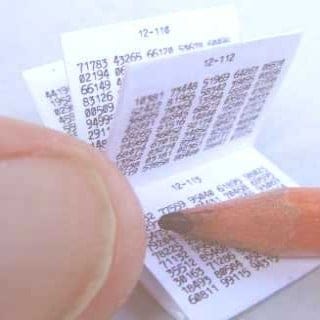
Chuỗi khoá được in trên một cuốn sổ bé xíu, để dễ cất dấu hay tiêu huỷ khi cần thiết. Mỗi lần mã hoá dùng một (hay nhiều) tờ trong cuốn sổ, những tờ đó sẽ bị huỷ sau khi dùng, do vậy mà có cái tên one-time-pad

Hình bên: một cuốn sổ OTP của KGB, được in trên giấy phim để dể cháy khi đốt

đĩa Vigenere

Tôi đến với Computer Science khá trể, nhớ lại hồi năm nhất đại học, khi lần đầu tiên học về toán tử XOR (bit-wise operator XOR), tôi đã nghĩ ngay đến phương pháp mã hoá đơn giản và hiệu quả: thông điệp cần gửi được XOR với một chuỗi ký tự ngẫu nhiên (chuỗi khoá), ở đầu nhận, người ta XOR chuỗi đã được mã hoá với chuỗi khoá lần nữa để giải mã thông điệp. Đây chính là biểu diễn máy tính của phương pháp mã hoá cổ xưa OTP (one-time-pad) được dùng từ thời đệ nhất thế chiến.

Lincolnshire Poacher (MI6 ?) 
Magnetic Fields (Deuxième Bureau?) 

OTP được các điệp viên CIA, KGB, MI6… dùng phổ biến trong hai cuộc thế chiến. Lý do thứ nhất là vì nó đơn giản: mã & giải mã chỉ cần dùng đến tính nhẩm (có thể dùng thêm bút chì và giấy), lý do thứ hai là nó rất an toàn. Tuy đã được dùng rất lâu từ trước nhưng mãi đến khoảng năm 1940, phương pháp này mới được chứng mình bằng lý thuyết về tính an toàn tuyệt đối của nó. Chứng minh được đưa ra đồng thời và độc lập bởi Claude Shannon (nhà toán học Mỹ, cha đẻ lý thuyết thông tin) và Vladimir Kotelnikov (viện sĩ khoa học Liên bang Nga, kỹ sư chế tạo rađa).

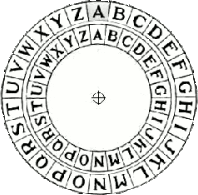
Mã & giải mã với OTP rất đơn giản, tương đương phép XOR, ta định nghĩa phép biến đổi như sau. Mã hoá = (text T(19) + khoá X(23)) mod 26 = Q(16). Giải mã = (Q(16) – khoá X(23)) mod 26 = text T(19), với 26 là kích thước bản chữ cái (phép XOR thực chất là phép cộng và modulo cho 2, với 2 là kích thước bảng chữ cái nhị phân: 0 & 1). Những người không giỏi tính nhẩm có thể dùng “thiết bị” sau (gọi là đĩa Vigenere), đĩa gồm 2 vòng giấy đặt đồng trục. Mã hoá text T với khoá X: gióng (xoay) vị trí [X] của vòng trong với vị trí [A] của vòng ngoài, tìm [T] tại vòng ngoài, ví trí tương đương [Q] tại vòng trong chính là kết quả. Giải mã là quá trình ngược lại: gióng [Q] của vòng trong với [A] của vòng ngoài, tìm [X] tại vòng trong, vị trí tương đương [T] tại vòng ngoài là văn bản gốc.

Có một cách sử dụng OTP đặc biệt gọi là chia xẻ bí mật (secret splitting), sau khi mã hoá, văn bản gốc bị huỷ thay vì khoá, sau đó khoá và văn bản mã hoá được đưa cho hai người khác nhau cất giữ. Chỉ khi hai người này cũng đồng ý nối hai “khoá” lại với nhau thì mới giải mã ra được văn bản gốc. Tương tự, có thể chia xẻ bí mật cho 3, 4,… người bằng cách sử dụng 2, 3,… khoá. Đây là cách bảo vệ các tài nguyên đặc biệt quan trọng, trách nhiệm bảo vệ đó được chia xẻ cho nhiều người, tuy nhiên lưu ý rằng nếu chỉ một phần của bí mật bị mất đi, thì bí mật đó cũng sẽ mất đi vĩnh viễn.

OTP là phương pháp mã hoá tuyệt đối an toàn nếu được sử dụng đúng cách, và là phương pháp tuyệt đối an toàn duy nhất cho đến thời điểm hiện tại. Văn bản được mã hoá với OTP không cho biết bất kỳ thông tin gì về văn bản gốc, ngoại trừ độ dài. Với một văn bản đã mã hoá cho trước, chúng ta có thể nghĩ ra các chuỗi khoá để “giải mã” nó về bất kỳ văn bản nào chúng ta muốn! Các phương pháp mã hoá mới sau này như DES (Data Encryption Standard), AES (Advanced Encryption Standard), PGP (Pretty Good Privacy), PKI (Public Key Infastructure)… tuy tiện dụng và có nhiều ưu điểm khác, nhưng về mặt lý thuyết không phải là không phá được. Nhưng trong sử dụng thực tế, có những lý do sau khiến OTP trở nên không an toàn:

  • Chuỗi khóa OTP không thực sự ngẫu nhiên (các nhân viên thư ký của KGB tạo ra OTP bằng cách gõ ngẫu nhiên lên máy đánh chữ, nhưng xu hướng gõ phím của tay người vẫn có những pattern nhất định).

  • Việc cất giữ và tiêu huỷ OTP có quá nhiều yếu tố rủi ro (đã có tình huống CIA giải được mã nhờ một cuốn sổ OTP đã bị đốt nhưng chưa cháy hết).

  • Mỗi trang OTP chỉ được dùng một lần (đã có lúc trong tình hình khẩn cấp, nhân viên KGB bất cẩn dùng một trang OTP cho nhiều lần mã hoá, dẫn đến việc CIA giải được khoảng 1% trong số những thông điệp gửi bởi KGB trong những năm 1945 ~ 1950).

Điểm yếu nhất của OTP nằm trong quá trình trao đổi khoá (key exchange), đó là một trong những lý do hình thành phương pháp public key rất tiện dụng sau này. Đến bây giờ, khi những phương tiện mã hoá và truyền thông đã quá hiện đại, người ta vẫn còn tiếp tục dùng OTP cho những kênh thông tin thuộc loại top secret (như đường dây hotline Washington DC – Moscow, liên lạc với tàu ngầm…) vì tính tuyệt đối an toàn đã được chứng minh lý thuyết của nó. Có thể kiểm chứng dấu vết của việc sử dụng OTP trong thực tế:

Các Number Station nổi tiếng bí ẩn, là những đài phát thanh không rõ nguồn gốc, phát trên băng tần sóng ngắn (shortwave) những bản tin toàn chữ số, được xem như những hoạt động tình báo của nhiều nước. Trên internet, những Numbers Relay Pages như nrp.write2me.com là hình thức mới của Number Station, cho phép mọi người gửi đi những thông điệp bí mật. Tất cả đều dưới hình thức những bộ 5 chữ số của mã hoá OTP (e.g: 41888 42037 89537 55295 14846 82981 63440…).

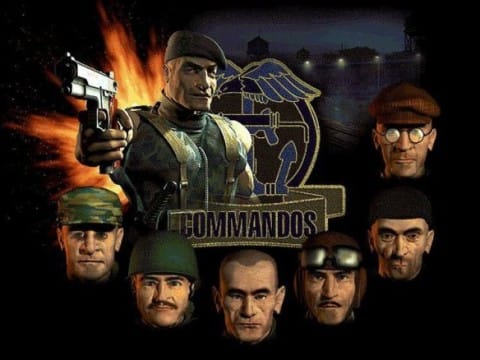
biệt kích, bộ binh & cảnh sát

Từ lâu tôi có một suy nghĩ, ẩn dụ vui vui về software engineering. Nay tìm được một bài viết tương tự ở đây, người ta cũng nghĩ như mình, và diễn đạt tốt hơn. Không có cách nào khác hơn là dịch lại nguyên văn bên dưới.

Có ba “lực lượng” hoàn toàn khác biệt có liên quan đến những giai đoạn hình thành và phát triển của một công ty, đó là: “biệt kích”, “bộ binh” và “cảnh sát”.

Biệt kích

Khi xâm chiếm một vùng lãnh thổ (hay thị trường), lực lượng tham chiến đầu tiên thường là các nhóm biệt kích. Như Stephen WozniakSteve Jobs của Apple, Don Estridge của IBM PC, Mitch KaporJonathan Sachs của Lotus 1-2-3… là những nhóm biệt kích. Nhảy dù vào sau lưng địch, đổ bộ bí mật lên bờ, gây ra thật nhiều thiệt hại cho đối phương, đặt đầu cầu cho những cuộc tấn công tiếp theo là công việc của biệt kích. Họ làm điều đó bằng cách tạo ra những mẫu hình sản phẩm mà ý tưởng sáng tạo của chúng xuất sắc đến nỗi những sản phẩm tương tự không có cách nào khác hơn là thua cuộc và bị đào thải.

Với hầu hết các loại sản phẩm, “biệt kích” là nhóm duy nhất có quyền sáng tạo: đẩy công nghệ tới những giới hạn mới, tìm ra những khách hàng tiềm năng, và xem quá trình phát triển như một cuộc phiêu lưu. Tuy vậy, cái họ làm ra được còn lâu mới có thể gọi là sản phẩm, chúng thường có những điểm yếu chết người mà cá tính “biệt kích” khó lòng nhận ra được.

“Biệt kích” thường chóng chán. Tôi (ND: tác giả) nhớ lại cuộc phỏng vấn đội trưởng một đội biệt kích Hoa Kỳ sau khi đổ bộ vào Panama: Chẳng có gì thần kỳ! Chúng ta vẫn còn đang ở đây! Một đôi khi nhóm biệt kích đâm chán nản ngay cả khi mẫu sản phẩm đầu tiên vẫn chưa xuất hiện, lúc đó đành phải chờ đến khi họ có hứng thú trở lại (hay là thuê một nhóm biệt kích khác). Một ví dụ: Ron Crane, trưởng nhóm “biệt kích” tại 3COM Corp, công ty sản xuất card Ethernet trước tiên, khi đang thiết kế card này, Crane phát chán và bỏ đi nghiên cứu hiệu ứng phản xạ âm thanh trên trần nhà công ty. Mọi người đành phải chờ cho đến khi Crane kết thúc việc nghiên cứu, thiết lập nên chuẩn nội thất mới cho công ty, tiếp tục với card mạng và đưa 3COM lên mức lợi nhuận 900 triệu.

BỘ BINH

Biệt kích là người tạo bước đột phá đầu tiên, tuy vậy hầu hết mọi cuộc chiến (hay thương vụ) đều là chiến tranh quy ước. Tiếp theo sau biệt kích, lực lượng bộ binh tấn công với số lượng lớn để phát triển hơn nữa những lợi thế có được ban đầu. Thử nghiệm, cải tiến, sản xuất, tiếp thị sản phẩm dựa trên nguyên mẫu ban đầu và bắt đầu thu về lợi nhuận. Nếu biệt kích sáng tạo những cách mới đề làm bị thương đối thủ, bộ binh mới thực sự là người kết liễu hoặc đẩy lùi đối phương, chiếm lĩnh trận địa và cắm cờ chiến thắng. Đôi khi, bộ binh cũng phải sửa chữa những sai lầm mà nhóm biệt kích mắc phải. Vì là một tập thể số đông, nhiều người, nhiều loại, bộ binh cần có một cơ chế quản lý, luật lệ phức tạp mà những tay biệt kích giỏi đều cảm thấy không thích hợp.

Cảnh sát

Khi các lực lượng biệt kích và bộ binh đã tiến được về Berlin (hay Baghdad), những vùng đất bị bỏ lại phía sau cũng cần được bình định, quản lý. Lúc đó cần có một đội ngũ cảnh sát: thiết lập cuộc sống dân sự, xây dựng phát triển kinh tế. Cảnh sát thường xem công việc là công việc hơn là một cuộc phiêu lưu, họ ngại thay đổi, chấp nhận phần thưởng ít hơn với những vị trí ít rủi ro hơn. IBM, AT&T… những công ty lâu đời, đa phần thuộc lực lượng thứ 3 này, nhiều khi họ còn không nhớ những thành viên “biệt kích” hay “bộ binh” đầu tiên là những ai.

Thành lập và phát triển một công ty, hay điều hành một dự án phần mềm lớn đều cần dùng đến cả 3 lực lượng này. Dùng sai người (như “biệt kích”) vào sai vị trí (như bảo trì) là một thảm họa. Làm một “biệt kích” nghe thật hấp dẫn, tuy nhiên cũng còn tùy vào tình huống, “biệt kích” cũng có thể gây hại nghiêm trọng cho chính dự án anh ta đang phục vụ.

math expression on www

I rarely need to write mathematics expressions on the web, but the last time I did, it took me some times to figure out just how to do. It’d turned out to be pretty easy, there’s a free LaTeX rendering server at yourequations.com. Excellent site! Just feed it with a LaTeX expression, it would render an image for you to put on your web page. This may be the best solution for now, while waiting for an workable HTML version that supports math.

There’s also a guide to embed this feature onto Blogger blogs (and also WordPress, and some PHP forums…) Just insert your LaTeX code between the pre (or code) tags as below and the jsTeXrender JavaScript would do the rest for you. This works fine for any browser with JavaScript support (mouse over the expressions and you would see the underlying LaTeX code). You may also need this LaTeX Reference Card for a list of LaTeX’s symbols.

Update, Otc 1st, 2010

Due to heavy traffic, yourequations.com has ceased the service. Please see this new post on how to run a LaTeX rendering server of your own!